
AIThis post was created with the assistance of artificial intelligence (AI).

TL;DR

Buying for a business?Offer from Amazon

Get business pricing on garage and car supplies

  • Business-only prices and quantity discounts
  • Tax-exempt purchasing
  • Multiple users, one account, clear invoices
As an affiliate, we earn on qualifying purchases.

A car diagnostic scanner connects to a vehicle’s onboard diagnostics system to read trouble codes and, depending on the tool and car, live data and other system information. A code points to a detected condition rather than naming a failed part, so use it to guide checks instead of guessing at repairs. Check vehicle coverage before buying, and remember that clearing codes can erase useful data and reset emissions readiness monitors.

A check-engine light can turn a quiet commute into a guessing game. A small scanner plugged in beneath the dashboard may give you a trouble code in seconds, but that code is a clue—not a shopping list of parts to replace. A car diagnostic scanner reads information from your car’s onboard diagnostics system. Depending on the scanner and vehicle, it may also show live sensor readings, stored conditions, and whether emissions monitors are ready. Knowing what those details mean can help you decide what to inspect, what to ask a mechanic, and when a warning calls for prompt attention. You’ll learn how scanners work, where their limits matter, and how to pick one that fits your car. Along the way, we’ll look at a familiar trap: replacing an oxygen sensor because its name appears in a code, only to find that a frayed wire caused the warning.
At a glance
Car Diagnostic Scanner: What It Does and How to Use It
Key insight
An oxygen-sensor-related trouble code does not prove the oxygen sensor has failed: wiring, an exhaust leak, or an air-fuel mixture problem can trigger a similar code, so diagnosis may require more ch…
Key takeaways
1

A trouble code points to a detected condition; it does not identify a failed part with certainty.

2

Scanner access to ABS, airbag, transmission, and other modules depends on the tool and vehicle.

3

Save codes and freeze-frame data before clearing anything.

4

Clearing codes may reset emissions readiness monitors, and inspection rules vary by location.

5

Confirm make, model, year, system coverage, app needs, and subscription costs before buying.

Step by step
1
How to use a scanner without mistaking a code for a repair
Use a car diagnostic scanner to gather evidence, then follow up on what the code suggests.

What a car diagnostic scanner can tell you

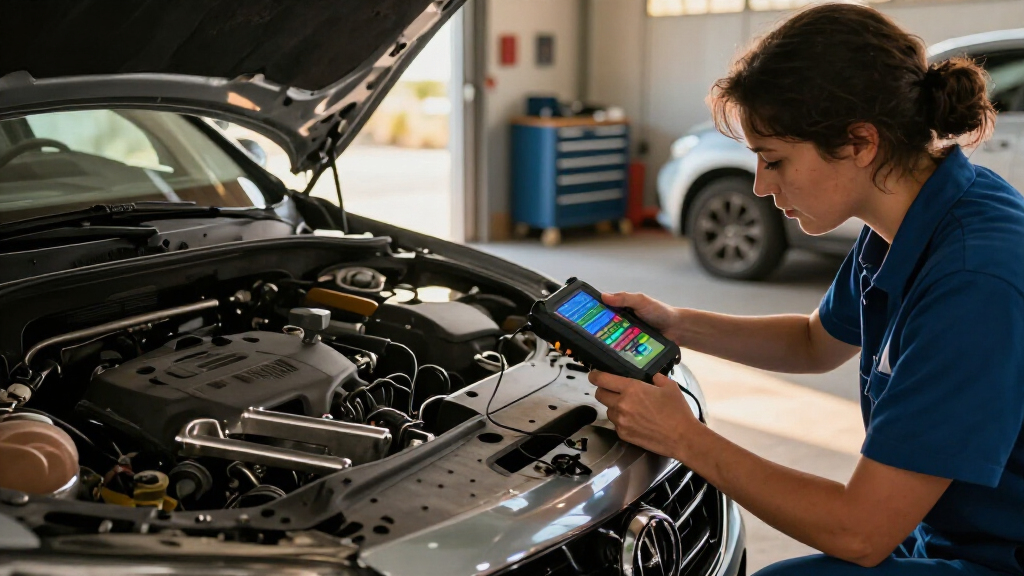
A car diagnostic scanner connects to your vehicle’s onboard diagnostics system to retrieve trouble codes and other information. Most cars sold in the United States from model year 1996 onward support OBD-II; other markets adopted OBD requirements on different schedules. The diagnostic port usually sits beneath the dashboard, often near the steering column, though its location varies by car. Think of the scanner as a translator reading a note left by your car’s computers. The note may identify a detected condition, but it rarely names the failed part with certainty. For example, an oxygen-sensor-related code can point toward a sensor circuit or exhaust mixture reading; a damaged wire or exhaust leak may also be the cause. Depending on the tool and vehicle, you can read diagnostic trouble codes, check emissions monitor readiness, and view data such as engine temperature or sensor behavior. Some scanners show freeze-frame data: a snapshot of conditions when the car recorded a fault. Imagine your check-engine light appearing while you climb a steep hill; that snapshot may show engine load and temperature at the time. A scan does not reveal every fault. A loose mechanical part, an intermittent problem, or an issue that has not met the system’s criteria for setting a code may leave no clear result. The scanner gives you a starting point for investigation, not a complete inspection.

Products Worth Considering

Autel MaxiCOM MK808BT PRO Bidirectional OBD2 Diagnostic Scanner

Autel MaxiCOM MK808BT PRO Bidirectional OBD2 Diagnostic Scanner

Autel MaxiSYS MS906 MAX Automotive Diagnostic Scanner, 10.1-Inch

Autel MaxiSYS MS906 MAX Automotive Diagnostic Scanner, 10.1-Inch

As an affiliate, we earn on qualifying purchases.

How scanner types change what you can check

A scanner’s features depend on its design, software, and compatibility with your car. A basic reader may fetch engine and emissions codes, while a more advanced tool can reach additional systems or run active tests. The phrase “OBD-II compatible” alone does not promise access to every module.
Scanner typeWhat it commonly offersWhat to check
Basic code readerCommon engine and emissions codes; often code clearingWhether it supports your model year and provides useful code details
Phone adapterWireless connection to an app; features varyApp compatibility, subscription costs, privacy, and required phone connection
Handheld scan toolBuilt-in screen, with coverage that varies by modelSupported systems, live data, and update policy
Professional or advanced toolMay reach more modules, run active tests, or support service functionsMake, model, year, software licensing, and function coverage
For instance, a simple reader may retrieve a powertrain code from a 2015 sedan but fail to read its ABS or airbag modules. Those systems often require a tool with confirmed vehicle-specific support. Even two scanners with similar screens can differ in access to body, transmission, and manufacturer-specific data. If you want to check an occasional check-engine light, a basic reader may be enough. If you plan to inspect an ABS warning or perform a service reset, verify support for that exact car and function before buying.

How to use a scanner without mistaking a code for a repair

Use a car diagnostic scanner to gather evidence, then follow up on what the code suggests. Read and save the results before clearing anything; deleting a code can remove information that helps explain when the fault appeared.
  1. Find your car’s diagnostic port. Look beneath the dashboard, often around the steering column. If it is not visible, check the owner’s manual rather than tugging at panels.
  2. Connect the scanner as its instructions direct. Some tools need the ignition on; others pair through a phone app. A wireless adapter may need a compatible app to display results.
  3. Read and record the codes. Write down the full code and any freeze-frame details. For example, note if a temperature or load reading seems linked to the moment the light appeared.
  4. Look up the code in reliable vehicle-specific information. Treat its description as a lead. An oxygen-sensor-related code does not prove the sensor itself failed.
  5. Check the cause before replacing parts. Depending on the code, the next step could involve inspecting a connector, wiring, or exhaust leak, or asking a technician to test the system.
  6. Clear codes only when you have a reason. Clearing can turn off a warning temporarily, but the fault may return; it can also reset emissions readiness monitors.
Say your hatchback shows a code related to an oxygen sensor. A quick parts purchase feels like a clean ending, but checking for a loose connector or exhaust leak may save money and find the real cause. The code describes what the system noticed; follow-up checks establish why.

Why clearing a warning can create a new problem

Clearing a trouble code removes its stored record and may turn off the check-engine light, but it does not repair the underlying fault. On many vehicles, the action also resets emissions readiness monitors, which may need normal driving conditions to complete again. Those monitors are the car’s way of reporting whether certain emissions checks have run. After a battery disconnect or code clear, your vehicle may show that some checks are not ready. If you have an emissions inspection coming up, local rules determine what readiness status is acceptable; clearing a code right before the visit can leave you with incomplete monitors rather than a clean pass. For example, you erase a warning on Monday because the light bothers you, then drive to an inspection station on Tuesday. The light may be off, but the car’s emissions checks may not have finished. A scanner can show readiness status, but it cannot promise that you will pass; inspection requirements differ by location. Save the codes and related data before clearing them, especially if a mechanic will diagnose the car. If a warning returns after a clear, that is useful evidence that the condition remains. Treat a clear as deleting a note from the dashboard, not fixing what the note describes.

When a scanner helps—and when you need a mechanic

A scanner can help you understand a warning and share useful information with a repair shop, but some faults need tests beyond a code read. Live data can narrow the possibilities, yet the right interpretation depends on engine design, temperature, load, and operating conditions. Imagine two drivers see a similar sensor code. One has a damaged connector after a recent repair; the other has an exhaust leak that changes the sensor reading. The scanner can point both toward the same area, but a visual inspection and targeted tests help distinguish the causes. A no-start can also involve the battery, fuel, ignition, mechanical parts, or other issues that a code scan alone will not settle. Take warning lights seriously. A steady check-engine light may allow cautious driving, but arrange a prompt check. A flashing check-engine light can signal a serious misfire that may damage the catalytic converter; reduce driving and seek assistance. Brakes, airbags, and high-voltage EV systems call for a certified mechanic because an incorrect repair can affect safety. A scanner is an information tool, not a repair tool. Use the result to describe what the car reported, then let the evidence guide the next check. If you suspect a safety-related fault, leave the diagnosis and repair to a qualified professional.

What to check before you buy a scanner

Choose a scanner by matching its confirmed coverage to your car and the checks you want to perform. The connector may fit, yet the tool may not read the module or run the function you need. Before you buy, check the vehicle make, model, year, and supported systems in the manufacturer’s coverage list. If you want ABS codes on a particular vehicle, confirm ABS access specifically; a general OBD-II claim does not guarantee it. Also check whether live data, service resets, or active tests are supported for your exact car. Phone adapters can be handy: you plug one in, open an app, and see results on a screen you already carry. But features may depend on the adapter, app, car, and a subscription. Standalone handheld tools avoid the phone pairing step, though updates or advanced functions can still have costs. Check the update policy, app support, and data handling before choosing. A driver who only wants to read occasional engine codes may prefer an inexpensive basic reader. Someone maintaining several vehicles or checking multiple modules may value broader coverage and clear updates. Start with the questions you want answered; the right scanner is the one that can answer them for your vehicle.

Frequently Asked Questions

Can a scanner tell me exactly which part to replace?

Usually not. A code identifies a detected condition, and several causes may produce a similar result. An oxygen-sensor-related code, for example, can stem from wiring or an exhaust leak as well as a faulty sensor.

Will any OBD-II scanner work with my car?

Many scanners can read basic emissions-related codes on compatible vehicles, but access to other systems and functions varies. Check coverage for your car’s make, model, year, and the specific module you want to scan.

Can a scanner read ABS or airbag codes?

Some scanners can access ABS and airbag modules, but a basic code reader often cannot. Confirm support for your exact vehicle before buying, and have safety-critical faults checked by a certified mechanic.

Can I clear the check-engine light with a scanner?

Many scanners can clear codes, but clearing does not fix the cause and the warning may return. It can also erase useful diagnostic information and reset emissions readiness monitors.
Is it safe to drive with the check-engine light on?

A steady light may allow cautious driving, but arrange a prompt check. A flashing light can signal a serious misfire that may damage the catalytic converter; reduce driving and seek assistance.

Does a car scanner guarantee I will pass an emissions inspection?

No. A scanner can show emissions-related faults and whether monitors are ready, but it cannot guarantee a pass. Requirements vary by location, and monitors may need normal driving conditions after a code clear or battery disconnect.

Conclusion

Remember the scanner’s job: it helps your car report what it noticed, then gives you clues for the next check. Save the code, look at the conditions around it, and verify the cause before buying a replacement part. That small pause can spare you an unnecessary repair and leave the useful evidence intact. When the warning concerns brakes, airbags, or a high-voltage EV system, take the car to a certified mechanic. Let the scanner start the conversation—not make the repair decision for you.
You May Also Like

What to Know Before Building a Full Car Audio Package

Unlock the essentials for building a full car audio package to ensure optimal sound quality and avoid common pitfalls—discover what you need to know.

How to Improve Weak Factory Audio Without Going Overboard

Meta description: “Master simple tips to enhance your factory audio without overdoing it, and discover how small adjustments can make a big difference in sound quality.

How to Set Up a Safer Trailer Camera or Rear Camera View

Properly setting up your trailer or rear camera enhances safety, but essential tips for optimal positioning and adjustments will help you avoid common mistakes.

Car Amplifiers Explained: Do You Really Need an Amp for Better Sound?

Learn why a car amplifier might be essential for better sound quality and how to determine if you really need one.