If you’re looking for the best ultrawide monitors for video editing and multitasking in 2025, I recommend checking out options like high-resolution models with excellent color accuracy, such as the INNOCN 40C1U and ASUS ProArt 34”. These screens offer wide color gamuts, adjustable ergonomics, and versatile connectivity, making them perfect for creative workflows. Keep exploring these choices, and you’ll find detailed insights that can help you pick the ideal display for your needs.
Key Takeaways
- Ultrawide monitors with high resolutions (up to 5K) and large sizes (34-40 inches) enhance workflow and visual detail for video editing.
- Color accuracy features like factory calibration, wide gamuts (sRGB, DCI-P3), and HDR support ensure precise color grading.
- Versatile connectivity options, including USB-C with Power Delivery, facilitate streamlined, single-cable setups.
- Ergonomic adjustments and VESA compatibility improve comfort during long editing sessions.
- Premium builds with integrated webcams, speakers, and multi-window features boost multitasking and remote collaboration.

Philips 34E1C5600HE 34" UltraWide QHD 21:9 Monitor with Built-in Windows Hello Webcam & Noise Canceling Mic, USB-C Docking, Stereo Speakers, 100Hz, 4-Year Advance Replacement,Black
EXPAND YOUR HORIZONS: 3440 x1440 UltraWide QHD (WQHD) resolution with 21:9 aspect ratio for efficient productivity
As an affiliate, we earn on qualifying purchases.
Philips 34E1C5600HE UltraWide QHD Monitor with Webcam & Speakers

If you’re looking for a monitor that boosts productivity and enhances remote collaboration, the Philips 34E1C5600HE UltraWide QHD is an excellent choice. Its 34-inch curved VA panel with a 3440×1440 resolution delivers immersive, sharp visuals with rich colors thanks to Ultra Wide-Color technology covering sRGB 123.24% and NTSC 99.25%. The wide viewing angles and 100Hz refresh rate keep visuals crisp and smooth, ideal for multitasking and creative work. Built-in features like a 5MP webcam, stereo speakers, noise-canceling mic, and USB-C with 90W Power Delivery make remote meetings seamless. Ergonomic adjustments and versatile connectivity complete this powerful, user-friendly monitor.
Best For: remote workers, creative professionals, and multitaskers seeking an immersive, feature-rich ultrawide monitor for productivity and collaboration.
Pros:
- Immersive 34-inch curved VA panel with high-resolution QHD display for sharp, detailed visuals.
- Built-in webcam, stereo speakers, noise-canceling microphone, and USB-C with 90W Power Delivery streamline remote communication.
- Wide viewing angles, high color accuracy, and ergonomic features enhance comfort and visual quality over extended use.
Cons:
- Heavier weight of 26.1 pounds may require sturdy mounting options or workspace adjustments.
- Slightly higher price point compared to standard monitors without integrated multimedia features.
- Limited to a 100Hz refresh rate, which may be less ideal for high-end gaming compared to higher refresh rate displays.

Dell 34 Plus USB-C Curved Monitor - S3425DW - 34-inch (3440 x 1440) up to 120 Hz 21:9 Display, VA Panel, AMD FreeSync Premium, 99% sRGB, 95% DCI-P3, Integrated Speakers, 3000:1 Contrast Ratio
Improved ComfortView Plus: Reduces harmful blue light emissions to ≤35%, for all-day comfort without sacrificing color accuracy.
As an affiliate, we earn on qualifying purchases.
Dell 34 Plus USB-C Curved Monitor (S3425DW)

The Dell 34 Plus USB-C Curved Monitor (S3425DW) stands out as an excellent choice for video editors and multitaskers who need a wide, immersive display. Featuring a 34-inch 3440×1440 resolution with a 21:9 aspect ratio, it offers vibrant colors thanks to 99% sRGB and 95% DCI-P3 coverage. The VA panel provides HDR support and a 3000:1 contrast ratio, enhancing image depth. With a 120Hz refresh rate and AMD FreeSync Premium, it ensures smooth visuals for work or gaming. The monitor’s USB-C connection delivers up to 65W power, reduces clutter, and supports easy, efficient multitasking.
Best For: video editors and multitaskers seeking an expansive, color-accurate display with smooth visuals and clutter-free connectivity.
Pros:
- Wide 34-inch curved display with high-resolution 3440×1440 for immersive viewing
- Vivid color coverage with 99% sRGB and 95% DCI-P3 for color accuracy and realism
- USB-C port providing up to 65W power delivery, reducing cable clutter and supporting multitasking
Cons:
- Relatively heavy at 20.7 pounds, which may impact portability or desk setup flexibility
- Response time of 0.03ms, which is very fast but could be overkill for casual users
- Limited information on built-in speakers’ audio quality, which may not satisfy audiophiles

INNOCN 40 Inch 5K 5120 x 2160p Ultrawide Monitor for Laptop, 21:9, 100Hz, IPS, HDMI, DP, FreeSync, HDR400, USB-C, DeltaE<2, Built-in Speakers, Height Adjustable, Black - 40C1U
【Super Clarity 5K Ultrawide Monitor】This new-gen rare 40 inch ultrawide 5K 5120 x 2160p 100Hz computer monitor adopt...
As an affiliate, we earn on qualifying purchases.
INNOCN 40 Inch 5K Ultrawide Monitor (40C1U)
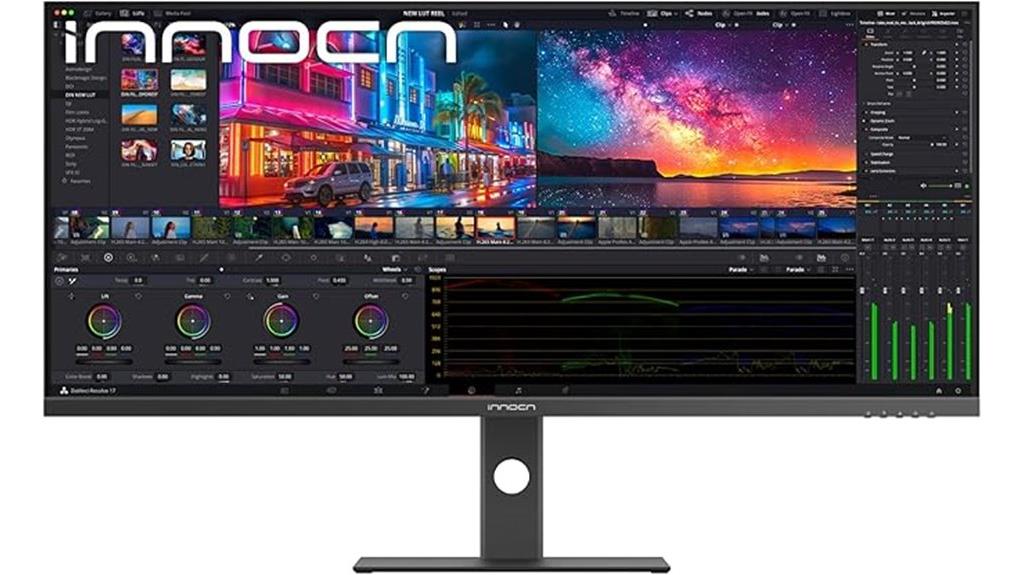
For video editors and multitaskers seeking precision and ample workspace, the INNOCN 40 Inch 5K Ultrawide Monitor stands out with its stunning 5K resolution and expansive 21:9 aspect ratio. It delivers crisp images with 5120 x 2160 pixels, supported by an IPS panel that covers 135% sRGB and 106% DCI-P3 color gamuts for accurate, vibrant colors. The 100Hz refresh rate ensures smooth visuals, while HDR400 support enhances contrast. Its frameless design, ergonomic adjustments, and eye-care features make long editing sessions comfortable. Multiple connectivity options, including HDMI 2.1, DisplayPort 1.4, and USB-C with power delivery, make it adaptable for a range of devices.
Best For: video editors, creative professionals, and multitaskers who need a high-resolution ultrawide display with accurate colors and versatile connectivity.
Pros:
- Stunning 5K resolution with crisp, vibrant images thanks to IPS panel and wide color gamut coverage (135% sRGB, 106% DCI-P3).
- Large 40-inch ultrawide display with 21:9 aspect ratio ideal for multitasking and immersive editing workflows.
- Multiple connectivity options including HDMI 2.1, DisplayPort 1.4, and USB-C with power delivery for flexible device compatibility.
Cons:
- Relatively heavy at approximately 34.1 pounds, which may require sturdy mounting solutions.
- Higher price point typical for high-end 5K ultrawide monitors, potentially limiting affordability.
- Limited stand height adjustment range, which might not suit all ergonomic preferences.

ASUS ProArt Display 34” Ultrawide Curved Professional HDR Monitor (PA34VCNV) - IPS, 21:9 3440 x 1440, 3800R Curve, 100% sRGB/Rec709, ΔE<2, Calman Verified, USB-C Docking PD 96W, RJ45, 3 Year Warranty
34.1-inch 21:9 3800R IPS curved display with frameless design
As an affiliate, we earn on qualifying purchases.
ASUS ProArt 34” Ultrawide Curved HDR Monitor (PA34VCNV)

The ASUS ProArt 34” Ultrawide Curved HDR Monitor (PA34VCNV) stands out as an ideal choice for professional video editors and creative professionals who need precise color accuracy and ample screen space. Its 34.1-inch ultra-wide curved display with a 21:9 aspect ratio and 3440×1440 resolution offers immersive viewing. The IPS technology guarantees wide viewing angles and consistent color. Factory pre-calibrated with Delta E <2 and 100% sRGB coverage, it assures color precision. With extensive connectivity, including USB-C with 96W Power Delivery, HDMI, and Ethernet, plus ergonomic adjustments, it’s designed for seamless workflows and extended comfort.
Best For: creative professionals and video editors who require precise color accuracy and an expansive ultra-wide display for immersive workflows.
Pros:
- Factory pre-calibrated with Delta E <2 for exceptional color precision
- Extensive connectivity options including USB-C with 96W Power Delivery, HDMI, and Ethernet
- Ergonomic adjustments for comfortable extended use
Cons:
- Heavier weight at 23.8 pounds may require sturdy mounting solutions
- Premium price point reflecting advanced features and calibration
- Limited to 3 years warranty, which may be shorter than some professional-grade monitors
INNOCN 40C1R Ultrawide Monitor (40″ WQHD, 3440×1440, 144Hz, HDR400, 21:9, USB-C, HDMI, Adjustable)

If you’re looking to boost your productivity and streamline your editing workflow, the INNOCN 40C1R Ultrawide Monitor is an excellent choice, especially for video editors and multitaskers. Its 40-inch, 21:9 display provides 18% more viewable area than a typical 34-inch monitor, with sharp visuals thanks to a 3440×1440 resolution and a premium ADS panel. The high contrast ratio of 1200:1 and 95% DCI-P3 color gamut ensure accurate, vibrant colors. With HDR400 support and a 144Hz refresh rate via DisplayPort, it’s also great for smooth gaming. Multiple connectivity options, adjustable ergonomics, and split-screen features make it versatile and highly functional for demanding workflows.
Best For: Creative professionals, video editors, and multitaskers seeking a large, high-quality ultrawide display to enhance productivity and visual accuracy.
Pros:
- Spacious 40-inch 21:9 ultrawide screen offers 18% more viewable area than standard 34-inch monitors.
- High-resolution 3440x1440p display with 95% DCI-P3 color gamut ensures vibrant and accurate colors.
- Multiple connectivity options including USB-C, HDMI, and DisplayPort, with ergonomic adjustments for comfort.
Cons:
- Larger size may require a substantial desk space and proper ergonomic setup.
- Premium price point might be a consideration for budget-conscious users.
- HDR400 support provides good contrast but may not match higher HDR standards for professional color grading.
Factors to Consider When Choosing Ultrawide Monitors for Video Editing and Multitasking
When choosing an ultrawide monitor for video editing and multitasking, I focus on key factors like screen size, resolution, and color accuracy to guarantee sharp visuals and true-to-life colors. I also consider connectivity options and ergonomic adjustments so I can customize my setup for comfort and efficiency. Finally, I weigh the price and warranty to find a reliable monitor that fits my budget.
Screen Size and Resolution
Choosing the right ultrawide monitor for video editing and multitasking hinges heavily on screen size and resolution. Larger monitors, like 34 inches or more, offer ample workspace, making it easier to manage multiple timelines or applications simultaneously. A higher resolution, such as QHD (2560×1440) or 4K, ensures sharper images and more accurate detail, which is essential for precise editing. Ultrawide screens with aspect ratios of 21:9 or similar provide a broader field of view, allowing me to see multiple windows or tools at once without constantly switching. A resolution of at least 3440×1440 strikes a good balance, enhancing clarity and supporting detailed color grading. Combining a larger size with high resolution streamlines workflow, reduces clutter, and boosts productivity, making it a smart choice for serious video editors.
Color Accuracy and Gamut
Selecting an ultrawide monitor with accurate colors is vital for high-quality video editing and multitasking. A wide color gamut, like 99% sRGB or more, ensures the monitor displays a broad spectrum of colors, essential for precise editing. Factory calibration and low Delta E values below 2 mean the monitor maintains high color accuracy straight out of the box, reducing the need for adjustments. Support for industry-standard color spaces, such as Rec.709 or DCI-P3, guarantees your work aligns with professional video production standards. Features like Ultra Wide-Color or AdobeRGB coverage deliver richer, more vibrant hues, enhancing visual workflows. Additionally, color calibration reports and factory pre-calibration help verify that the monitor consistently reproduces colors accurately, making it a dependable choice for serious editing and multitasking.
Connectivity Options Needed
Ensuring your ultrawide monitor has the right connectivity options is essential for a seamless video editing and multitasking experience. Look for models offering multiple ports like HDMI, DisplayPort, and USB-C, so you can connect various devices effortlessly. USB-C with Power Delivery is especially useful, allowing you to charge your laptop while transmitting video and data through a single cable, minimizing clutter. Check if the monitor supports high-resolution signals like 4K and high refresh rates to ensure smooth editing and multitasking. An integrated hub or additional USB ports can make connecting peripherals like external drives, keyboards, and mice more convenient. For professional workflows, consider advanced options like Thunderbolt or Ethernet ports, which facilitate faster data transfer and network access when needed.
Ergonomic Adjustments
Since long hours of video editing and multitasking can cause discomfort, it’s important to contemplate ergonomic adjustments when choosing an ultrawide monitor. Features like tilt, swivel, and height adjustment allow me to customize the monitor’s position for maximum comfort, reducing strain on my neck, back, and eyes. VESA compatibility is a bonus, letting me mount the monitor on adjustable arms or wall mounts for better workspace flexibility. Monitors with ergonomic controls make it easy to switch between portrait and landscape modes, optimizing workflow. Ensuring these adjustments are simple and precise helps prevent repetitive strain injuries and supports a healthier posture during extended work sessions. Prioritizing ergonomic features is key to maintaining comfort and productivity in demanding editing and multitasking environments.
Price and Warranty
When choosing an ultrawide monitor for video editing and multitasking, balancing price and warranty is essential to make a smart investment. You’ll want a model that fits your budget while providing the features you need, like accurate color calibration and good connectivity. Check the warranty duration—longer periods, like 3 to 4 years, offer peace of mind, especially for professional use. Higher-priced monitors often include advanced calibration tools, better color accuracy, and extended warranty options, which can justify the cost. Comparing warranty policies across models helps you find the best balance of support and value. Remember, a monitor with a solid warranty can save you money and hassle over time, making it a smarter choice for demanding editing tasks and multitasking needs.
Frequently Asked Questions
How Does Screen Curvature Impact Editing Precision and Comfort?
Screen curvature really enhances my editing precision and comfort. It keeps the entire display at a consistent distance, reducing eye strain and making it easier to focus on details. I notice fewer distortions and less head movement, which helps me work longer without fatigue. Overall, curved screens create a more immersive experience that boosts both accuracy and comfort during intensive editing sessions.
Are Built-In Speakers Sufficient for Professional Audio Editing?
Honestly, built-in speakers just aren’t enough for professional audio editing. Think of them as the Morse code of sound—useful for basic notifications, but not for nuanced, high-quality work. I always recommend investing in a good pair of external studio monitors or high-quality headphones. They give you the detail and clarity needed to make precise edits, ensuring your audio matches the professional standards you’re aiming for.
What Is the Optimal Refresh Rate for Smooth Multitasking?
I find that a refresh rate of at least 120Hz offers the smoothest multitasking experience. It reduces motion blur and screen tearing, especially when switching between multiple windows or scrolling quickly. For gaming or fast-paced tasks, 144Hz or higher is even better. If you want seamless performance without lag or stuttering, aiming for 120Hz to 144Hz is ideal. It makes multitasking feel effortless and more responsive.
How Important Are Color Accuracy and Calibration Features?
Imagine painting a masterpiece; every color needs to be spot-on. That’s why I believe color accuracy and calibration features are vital. They ensure your monitor shows true-to-life colors, which is essential for video editing. Without proper calibration, your work might look perfect on your screen but off once viewed elsewhere. So, investing in a monitor with excellent color accuracy really helps you create confidently and professionally.
Can Ultrawide Monitors Replace Multiple Monitors Effectively?
Absolutely, ultrawide monitors can replace multiple monitors effectively. I’ve found they streamline my workflow by reducing clutter and offering seamless viewing across tasks. With their large screens, I can multitask effortlessly without switching between windows. Plus, they often come with features like picture-in-picture and split-screen, making multitasking even easier. For me, ultrawides are a game-changer, providing the space and flexibility I need for productivity and creative work.
Conclusion
Choosing the right ultrawide monitor feels like finding a trusty sidekick for your creative journey. These options offer the perfect blend of clarity, size, and versatility to boost your video editing and multitasking game. Remember, the right screen isn’t just a tool—it’s the canvas where your ideas come alive. Think of it as the window to your creative soul, making every project smoother and more inspiring.