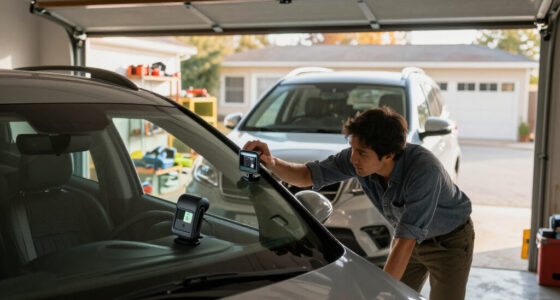
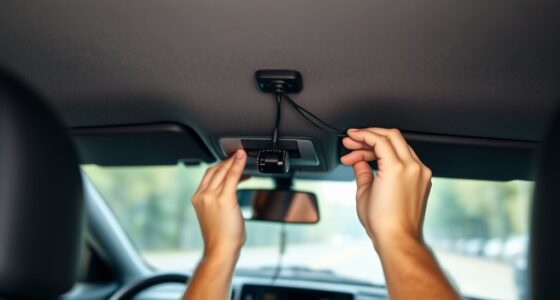
Dash cam parking mode keeps an eye on your vehicle even when parked, offering vital security like monitoring for theft, vandalism, or accidents. It activates automatically using features like motion detection or G-sensors to start recording when it detects movement or impacts. This continuous surveillance can act as a deterrent and provide valuable evidence if an incident occurs. To learn how to maximize these protections and optimize your dash cam’s features, keep exploring more insights.
Key Takeaways
- Parking mode activates the dash cam to record suspicious activity or impacts when the vehicle is parked.
- Features like motion detection and G-sensors automatically trigger recording during incidents.
- Continuous or time-lapse recording covers extended periods, providing comprehensive surveillance.
- Low-power standby modes help conserve battery while maintaining security functions.
- Recorded footage offers vital evidence for insurance claims and theft or vandalism investigations.

Parking mode on a dash cam allows you to monitor your vehicle even when you’re not around, providing added security and peace of mind. When your car is parked, this feature activates the camera to record any suspicious activity or potential accidents, so you don’t have to worry about what might happen in your absence. This continuous surveillance acts as a deterrent against theft, vandalism, or hit-and-run incidents, ensuring your vehicle is protected 24/7. Knowing your dash cam is actively watching over your car can greatly reduce stress, especially if you park in high-risk areas or overnight. Additionally, the effectiveness of parking mode can be influenced by the contrast ratio, which affects how well details are discernible in various lighting conditions, especially in low-light environments. To make the most of parking mode, it’s essential to understand the security features your dash cam offers. Many models come with motion detection, which triggers recording when movement is detected nearby, saving storage and battery life. Some advanced units have G-sensors that activate recording if impact or sudden acceleration is sensed, capturing critical evidence in case of accidents. Additionally, parking mode often includes features like time-lapse recording or low-power standby modes, allowing your dash cam to stay active without draining your battery excessively. These security features work together to guarantee that your vehicle is monitored effectively without constant manual intervention.
As an affiliate, we earn on qualifying purchases.
Frequently Asked Questions
How Long Does Parking Mode Footage Typically Last?
Parking mode footage usually lasts between 24 to 72 hours, depending on your dash cam’s settings and storage capacity. If you have ample footage storage, your parking duration might extend, but if space is limited, older footage gets overwritten quickly. To maximize protection, regularly check and adjust your dash cam’s settings, ensuring important clips are saved before they’re replaced. This way, you won’t miss critical moments when your car’s parked.
Can Parking Mode Drain My Car Battery Quickly?
Yes, parking mode can drain your car battery quickly if it has high power consumption or if your battery is weak. It continuously uses power to monitor and record, which can lead to battery drain over time. To prevent this, you can use features like parking mode timers, enable low power mode, or install a hardwire kit with a voltage cutoff. Regularly check your battery health to avoid unexpected issues.
Is Parking Mode Activated Automatically or Manually?
Parking mode typically activates automatically when your dash cam detects that your vehicle is parked and turned off, using built-in sensors or motion detection. However, some models offer manual control, allowing you to enable or disable parking mode whenever you choose. It’s important to check your dash cam’s settings, as automatic activation provides convenience, while manual control gives you flexibility to turn it on only when needed.
What Legal Considerations Exist for Using Parking Mode Recordings?
Did you know over 60% of drivers use parking mode for added security? When recording in parking mode, you must consider legal compliance and privacy concerns. Laws vary by region, so make certain your dash cam’s recordings don’t infringe on others’ privacy rights. Always clearly mark your dash cam and avoid recording private moments. Staying informed about local regulations helps you protect your rights while safeguarding your vehicle legally.
How Does Parking Mode Impact My Dash Cam’s Warranty?
Parking mode typically doesn’t void your dash cam’s warranty coverage, but using it improperly or causing damage while recording could affect damage claims. You should review your manufacturer’s warranty policy to understand any specific restrictions or conditions. Proper installation and regular maintenance help guarantee your dash cam functions correctly, so your warranty stays valid. If damage occurs while parking mode is active, having clear footage can support your damage claims effectively.
car dash camera motion detection
As an affiliate, we earn on qualifying purchases.
As an affiliate, we earn on qualifying purchases.
Conclusion
Now that you know how dash cam parking mode works, your car’s practically invincible when parked! It’s like having a tiny security guard lurking behind your windshield 24/7, ready to catch any sneaky thief or reckless driver in the act. With this tiny hero watching over your vehicle, you can relax knowing nothing will escape its watchful eye—your car’s safety is now unstoppable, and your peace of mind is completely protected!
As an affiliate, we earn on qualifying purchases.
As an affiliate, we earn on qualifying purchases.