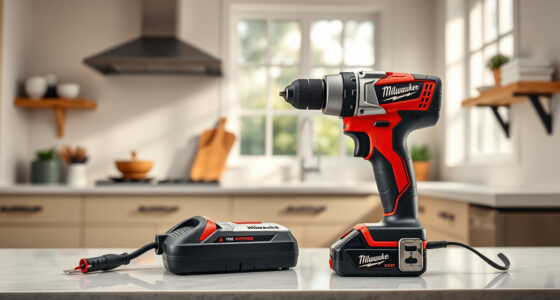
If your Milwaukee M18 charger is blinking red, it can signal a variety of issues ranging from battery problems to charger malfunctions. Understanding what causes this indicator and how to fix it can save you time and keep your power tools running smoothly.

Get garage and car supplies delivered free — and shop member deals
- Fast, free delivery on millions of items
- Access to Prime Big Deal Days deals on October 6–7
- Prime Video, Amazon Music and more included
In this guide, we’ll walk you through practical, safe steps to identify the root cause of the blinking red light and apply effective fixes. Whether you’re a professional tradesperson or a DIY enthusiast, these tips will help you get your Milwaukee tools back in action efficiently.
Key Takeaways
| Check Battery Compatibility | Ensure batteries are genuine and compatible with your charger. |
| Inspect for Damage | Look for physical damage or dirt on batteries and charger ports. |
| Follow Proper Charging Procedures | Use the correct batteries and avoid overcharging or overheating. |
| Perform Reset and Testing | Reset the charger and test with different batteries for diagnosis. |
Understanding the Red Blinking Indicator
The red blinking light on your Milwaukee charger typically indicates an error or warning. This could be related to the battery, the charger, or environmental factors. Recognizing what the blinking means is the first step toward fixing the issue.
Consulting your charger’s manual can provide specific blinking patterns and their meanings. Common causes include overheating, incompatible batteries, or internal faults.
Step 1: Safety First and Initial Inspection
- Unplug the charger from the power source to prevent electrical hazards.
- Remove the battery and inspect it for physical damage, such as swelling, corrosion, or cracks.
- Check the charger ports and contacts for dirt, debris, or corrosion. Clean gently with a dry cloth if needed.
Ensure your workspace is dry and well-ventilated. Never attempt to repair internal components yourself; contact Milwaukee support if you suspect internal faults.
Step 2: Verify Battery Compatibility and Condition
The charger included with your Milwaukee M18 18V Cordless Power Tool Combo Kit supports Milwaukee M18 batteries, including high-capacity and extended models.
Test the charger with a known good battery. If the blinking persists, the problem may be with the charger itself or the battery circuitry.
If using third-party or incompatible batteries, switch to genuine Milwaukee batteries for proper charging and safety.
Step 3: Address Overheating and Environmental Factors
- Allow the charger to cool down if it feels hot. Overheating can trigger the red blinking as a safety feature.
- Ensure proper ventilation around the charger, avoiding enclosed spaces or direct sunlight.
- Remove any obstructions or dust from the charger vents.
Wait at least 15-30 minutes before resuming charging to let the device cool properly.
Step 4: Reset and Test the Charger
Many Milwaukee chargers can be reset by unplugging them for about 30 seconds, then plugging back in. This can clear minor faults.
Test with different batteries to determine if the issue is with a specific battery or the charger itself. If the red blinking continues, consider testing with a known working charger or contacting Milwaukee support for warranty service.
Additional Tips and Precautions
- Use genuine Milwaukee batteries and chargers to ensure safety and compatibility.
- Avoid overcharging batteries—remove them once fully charged.
- Store batteries in a cool, dry place to prevent damage and degradation.
- Never attempt to open or repair the charger yourself.
Following these tips can extend the lifespan of your tools and ensure safe operation.
The Products in This Guide

Milwaukee M18 18V Cordless Power Tool Combo Kit
- ✔ Voltage: 18V
- ✔ Number of Tools: 8
- ✔ Batteries Included: 3

Milwaukee Shockwave 100pcs Impact Driver Bit Set Packout
- ✔ Impact Bits: 100
- ✔ Case Type: Packout
- ✔ Material: High-speed steel
Milwaukee M18 18V Cordless Power Tool Combo Kit
The Milwaukee M18 18V Cordless Power Tool Combo Kit offers an extensive set of tools, batteries, and accessories, making it ideal for construction, remodeling, and maintenance professionals. Its power system ensures consistent performance across all tools, with rapid charging included for minimal downtime.
Pros:
- Includes 8 essential tools for various tasks
- Three batteries for extended work sessions
- Compact and durable tool bags included
- Powerful M18 lithium-ion batteries
Cons:
- Some users may find the kit expensive
- Requires familiarity with battery handling
- Charger may need troubleshooting if blinking red
Best for: Professional contractors and serious DIYers needing a comprehensive, reliable tool set.
Not ideal for: Casual users who only need one or two tools occasionally.
Bottom line: A comprehensive, dependable power tool kit perfect for demanding professional jobs.
Milwaukee Shockwave 100pcs Impact Driver Bit Set Packout
This Milwaukee Shockwave 100pcs Impact Driver Bit Set Packout provides a wide variety of bits for different applications, all stored in a durable Packout case for easy transport and organization. It complements your Milwaukee power tools by ensuring you have the right bit for every task.
Pros:
- 100 impact driver bits for versatility
- Packout case for organization
- Durable and high-quality bits
- Compatible with Milwaukee impact drivers
Cons:
- Bits may be overkill for casual use
- Storage case adds bulk
- Some bits may not fit non-Milwaukee impact drivers
Best for: Professionals and serious DIYers needing a comprehensive bit set.
Not ideal for: Occasional users or those with minimal impact driver needs.
Bottom line: A versatile and durable impact driver bit set for professional use.
Frequently Asked Questions
What does a blinking red light on my Milwaukee charger mean?
It typically indicates an error such as overheating, incompatible battery, or internal fault. Consult your manual for specific patterns.
Can I use non-Milwaukee batteries with my charger?
It is recommended to use genuine Milwaukee batteries to ensure compatibility and safety. Non-compatible batteries can cause charging issues.
How do I reset my Milwaukee charger?
Unplug the charger from the power source, wait for about 30 seconds, then plug it back in. This may clear minor faults.
What should I do if my charger continues blinking red after troubleshooting?
Contact Milwaukee customer support or seek professional repair service, especially if the charger or batteries show signs of damage.
Is it safe to open the charger myself?
No, opening the charger can be dangerous and will void your warranty. Always seek professional repair or contact Milwaukee support.
Getting Your Milwaukee Charger Back on Track
Dealing with a blinking red light on your Milwaukee charger can be frustrating, but most issues are manageable with careful inspection and proper troubleshooting. Always prioritize safety, use genuine batteries, and follow recommended procedures to prolong the life of your tools and charger.
If problems persist despite troubleshooting, reaching out to Milwaukee support ensures professional assistance. With the right approach, you can keep your Milwaukee power tools performing at their best for years to come.
Affiliate disclosure: As an Amazon Associate we earn from qualifying purchases. Prices and availability are accurate as of the time of publishing.
Fall Picks
fall essentials
As an affiliate, we earn on qualifying purchases.