If your DEWALT cordless drill or power tool battery isn’t charging, it can be frustrating and halt your work. Common causes include charger issues, battery wear, or connection problems. This guide provides clear, safe steps to diagnose and fix charging issues, helping you get back to your projects quickly.

Get garage and car supplies delivered free — and shop member deals
- Fast, free delivery on millions of items
- Access to Prime Big Deal Days deals on October 6–7
- Prime Video, Amazon Music and more included
Key Takeaways
| Check charger and power source | Ensure the charger is plugged in, connected correctly, and the outlet is working. |
| Inspect the battery contacts | Clean the contacts on the battery and charger to remove dirt or corrosion. |
| Verify charger indicator lights | Red or flashing lights may indicate a problem; refer to the charger manual. |
| Test with another compatible battery | Determine if the issue is with the battery or charger. |
| Replace worn batteries or faulty chargers | Consider replacing if the battery no longer holds a charge or the charger is defective. |
Step 1: Check the Power Source
- Ensure the electrical outlet is working by plugging in another device.
- Check that the charger is securely connected to both the power outlet and the battery.
- If using a power strip, try plugging directly into the wall socket.
Step 2: Inspect the Charger and Battery Contacts
- Remove the battery from the charger and clean the metal contacts with a dry cloth or a soft brush.
- Inspect for corrosion, dirt, or damage on the contacts.
- Ensure the contacts align properly when re-inserting the battery.
Step 3: Observe Charger Indicator Lights
Most DEWALT chargers have indicator lights. A solid red typically indicates charging, while a flashing light may suggest an issue. Refer to your specific charger manual to interpret these signals.
Step 4: Test with a Known Good Battery
- If available, try charging a different compatible DEWALT battery.
- If the second battery charges normally, your original battery may be faulty.
- If the new battery also doesn’t charge, the charger could be defective.
Step 5: Consider Replacing Faulty Components
If your battery isn’t holding a charge or the charger shows persistent error signals, consider replacing the battery or charger. Use genuine DEWALT replacements for best results.
The Products in This Guide

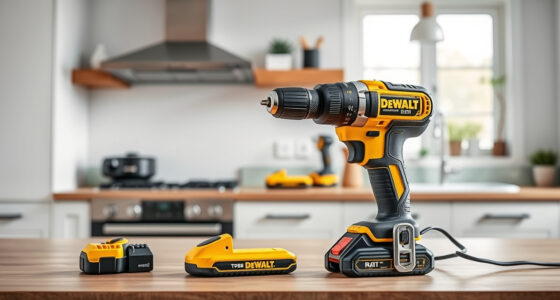
DEWALT 20V MAX Cordless Drill Driver Set
- ✔ LED Light: Yes
- ✔ Handle Type: Ergonomic
- ✔ Drive Size: 1/2 inch

DEWALT Drill Bit Set
- ✔ Size Markings: On shank
- ✔ Web Design: Tapered
- ✔ Application: Plastic, Wood, Metal
DEWALT 20V MAX Cordless Drill Driver Set
The DEWALT 20V MAX Cordless Drill Driver Set offers excellent power and durability, making it a reliable choice for both professionals and DIY enthusiasts. Its brushless motor delivers more run time, and the included 2.0 Ah battery ensures consistent performance.
Pros:
- Powerful brushless motor for longer runtime
- Compact and lightweight design
- Includes 2.0 Ah battery and charger
- Ergonomic grip and LED light
Cons:
- Battery may wear over time
- Charger indicator lights can be confusing for beginners
Best for: General-purpose drilling and fastening in tight spaces
Not ideal for: Heavy-duty industrial applications
Bottom line: A versatile, powerful drill ideal for a wide range of tasks.
DEWALT Drill Bit Set
This DEWALT Drill Bit Set features durable high-speed steel bits with a 135-degree split point, perfect for various materials like plastic, wood, and metal. It complements your power tools for efficient drilling.
Pros:
- High durability and corrosion resistance
- Includes multiple sizes for versatility
- Tapered web design for strength
- Easy to identify sizes
Cons:
- Bits may wear faster with heavy use
- Not suitable for industrial-scale drilling
Best for: Home projects and light to medium-duty tasks
Not ideal for: Heavy-duty industrial applications
Bottom line: A reliable set for accurate, versatile drilling across materials.
Frequently Asked Questions
Why isn’t my DEWALT battery charging?
Common reasons include a faulty charger, dirty contacts, battery wear, or power source issues. Follow the troubleshooting steps to identify the cause.
How can I tell if my charger is working properly?
Check the indicator lights; refer to your charger manual for specific signals. Test with a different compatible battery if available.
Can I fix a dead battery myself?
Generally, rechargeable batteries are not user-serviceable. If the battery no longer holds a charge, consider replacing it with a genuine DEWALT battery.
Is it safe to clean the battery contacts?
Yes, gently clean contacts with a dry cloth or a soft brush to remove dirt and corrosion. Avoid using liquids or abrasive materials.
Get Your Power Tools Running Smoothly Again
Dealing with a DEWALT battery that won’t charge can be straightforward with proper troubleshooting. By checking your power source, cleaning contacts, and testing components, you’ll identify the issue efficiently. Always prioritize safety and consider replacing components when necessary to ensure optimal performance of your cordless tools.
Affiliate disclosure: As an Amazon Associate we earn from qualifying purchases. Prices and availability are accurate as of the time of publishing.
Halloween Picks
halloween
As an affiliate, we earn on qualifying purchases.